I didn’t harden a fresh AWS account for Lab 1. I hardened the study account I had been using for cloud-certification labs. Cluttered. Already the management account of an AWS Organization. CloudTrail, Config, and Security Hub were already on from a prior course.
That was the point. Real assessments start with a messy account, not a clean one. I ran it the way I’d run an engagement: assess the current state, remediate what the report flagged, build the baseline, and prove each step with the same evidence an assessor would ask for.
Step 1: Assess (credential report as the population)
I started with the IAM credential report: one CSV row per IAM user (plus root), covering MFA status, access-key age, and last use. Before I changed anything, I also pulled the account summary, list-users / list-groups / list-roles, the password policy, Access Analyzer, Identity Center instances, and the Organizations description.
What passed, and what didn’t:
| Area | What the inventory showed | Finding | Control |
|---|---|---|---|
| Root account | MFA enabled, no access keys, account alias set | Satisfied (recorded as passing) | IA-2(1) |
| Admin access key | One active key, ~203 days old | Stale credential, rotation overdue | IA-5 |
| Password policy | 14-char minimum, complexity, 90-day max age, but reuse prevention absent | Missing password-history control | IA-5(1) |
| Cost guardrail | No budget or billing alert configured | No spend guardrail / no early warning for credential abuse | Operational hygiene |
 Root MFA enrolled with a TOTP app and two FIDO2 hardware keys. No root access keys. Account ID blacked out in the device ARNs.
Three gaps. A 203-day-old key isn’t an incident. It’s the quiet drift a periodic access review exists to catch. The missing budget isn’t an access-control finding, but a runaway bill is often the first visible symptom of a leaked key, so I treat it as cheap early-warning telemetry.
Step 2: Remediate before you build
I didn’t stack a new baseline on top of open findings. I fixed what the report flagged first.
- Rotated the 203-day key. I created a fresh access key, repointed the CLI, and deleted the old one. One key, created today. The IA-5 gap closes in the next credential report.
- Added password-reuse prevention. I set
PasswordReusePreventionto 5 and left the existing 14-character minimum, complexity, and 90-day max-age fields alone. (Why 90-day rotation still gets an asterisk is below.) - Created a cost guardrail. A
$10/monthbudget with alerts at 80% of actual spend and 100% of forecasted spend. A leaked key becomes a notification instead of a silent problem.
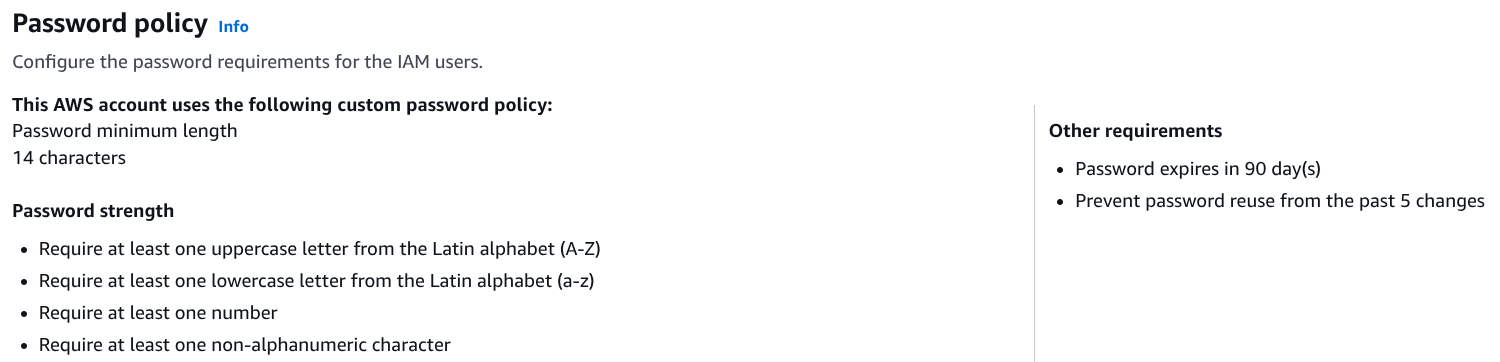 Reuse prevention set to the last 5 passwords. Existing length, complexity, and max-age fields left as they were.
Step 3: Build the baseline
With the findings cleared, I built the baseline: MFA enforcement, group-based access, short-lived roles instead of static keys, Access Analyzer, and Identity Center federation.
MFA enforcement: the one-word bug that fails open
I wanted to deny everything unless MFA was present, except the self-service actions a user needs to enroll MFA. The failure mode is one condition operator.
{
"Version": "2012-10-17",
"Statement": [{
"Sid": "DenyAllExceptUnlessMFAPresent",
"Effect": "Deny",
"NotAction": [
"iam:CreateVirtualMFADevice",
"iam:EnableMFADevice",
"iam:GetAccountPasswordPolicy",
"iam:GetMFADevice",
"iam:GetUser",
"iam:ListMFADevices",
"iam:ListUsers",
"iam:ListVirtualMFADevices",
"iam:ResyncMFADevice",
"iam:ChangePassword",
"sts:GetSessionToken"
],
"Resource": "*",
"Condition": {
"BoolIfExists": {
"aws:MultiFactorAuthPresent": "false"
}
}
}]
}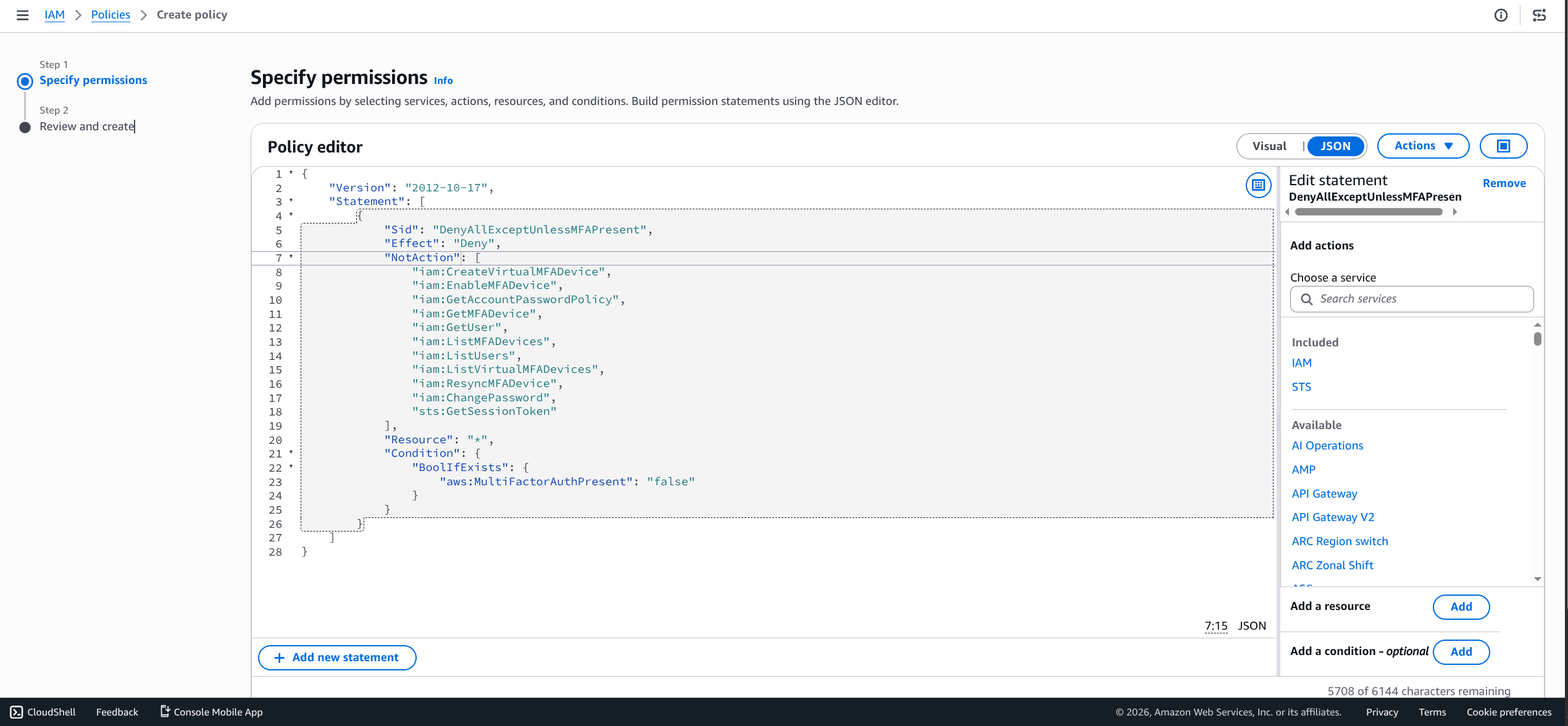 Same policy in the console JSON editor. The control turns on
 BoolIfExists in the condition block.
aws:MultiFactorAuthPresent only shows up in the request context when AWS knows whether MFA was used: console sign-in, or an STS session minted with MFA. true for an MFA session. false for one without.
A request signed with long-term IAM access keys doesn’t carry the key at all. It’s absent, not false. A plain Bool condition on a missing value doesn’t match, so the Deny never fires and the request falls through to whatever Allow exists. The policy fails open for permanent AKIA... keys: the credential type that leaks in git history and CI logs.
BoolIfExists fixes it. When the key is missing, the condition is satisfied, so an absent MFA context counts as “no MFA,” the Deny fires, and long-term keys without an MFA session are blocked. Plain Bool is fail-open. BoolIfExists is fail-closed. One word.
Two entries in that NotAction list matter:
sts:GetSessionTokenis how a user with only long-term keys mints an MFA session that carries MFA context forward (aws sts get-session-token --serial-number <mfa-arn> --token-code <code>).AssumeRoleaccepts MFA too, but only at assume-time. It does not putaws:MultiFactorAuthPresenton the resulting session. AMultiFactorAuthPresentdeny on an identity-based policy is satisfied by aGetSessionTokensession, not an assumed-role one. DenyGetSessionTokenand a CLI user can never escalate to MFA, including the verification step that proves the policy works.- The
*MFADevice*/iam:Get*/iam:List*entries follow AWS’s documented self-service set so a not-yet-enrolled user can reach their user page and register a device. I also keptiam:ChangePasswordandiam:GetAccountPasswordPolicyso an expired-password CLI user can self-recover. AWS recommends against that pair because it allows a password change without MFA. At lab scope I kept them and named the tradeoff. The stricter pattern drops both.
I didn’t take the policy’s word for it. I proved the deny. From a terminal authenticated with the admin’s long-term access key (no MFA session), aws iam list-roles returned AccessDenied from policy/RequireMFA. The same call from CloudShell, which inherits the MFA-authenticated console session, succeeded. I ran that test in a second browser session before attaching RequireMFA to any group and before signing out, so a misconfiguration couldn’t lock me out of my own account.
 Admin long-term access key calling
 list-roles refused through policy/RequireMFA. Same call from an MFA-authenticated session succeeds. Account ID blacked out in the error ARNs.
Group-based least privilege (AC-2 / AC-6)
Access granted through group membership is access you can review and revoke as a unit. A policy attached directly to a user is invisible to that review until someone goes looking for it.
I created three groups (lab-admins, lab-auditors, lab-developers), attached RequireMFA to each, moved the admin into lab-admins, and detached the direct AdministratorAccess attachment from the user. Same effective permissions. Different shape for an access review. That is the AC-2 / AC-6 distinction.
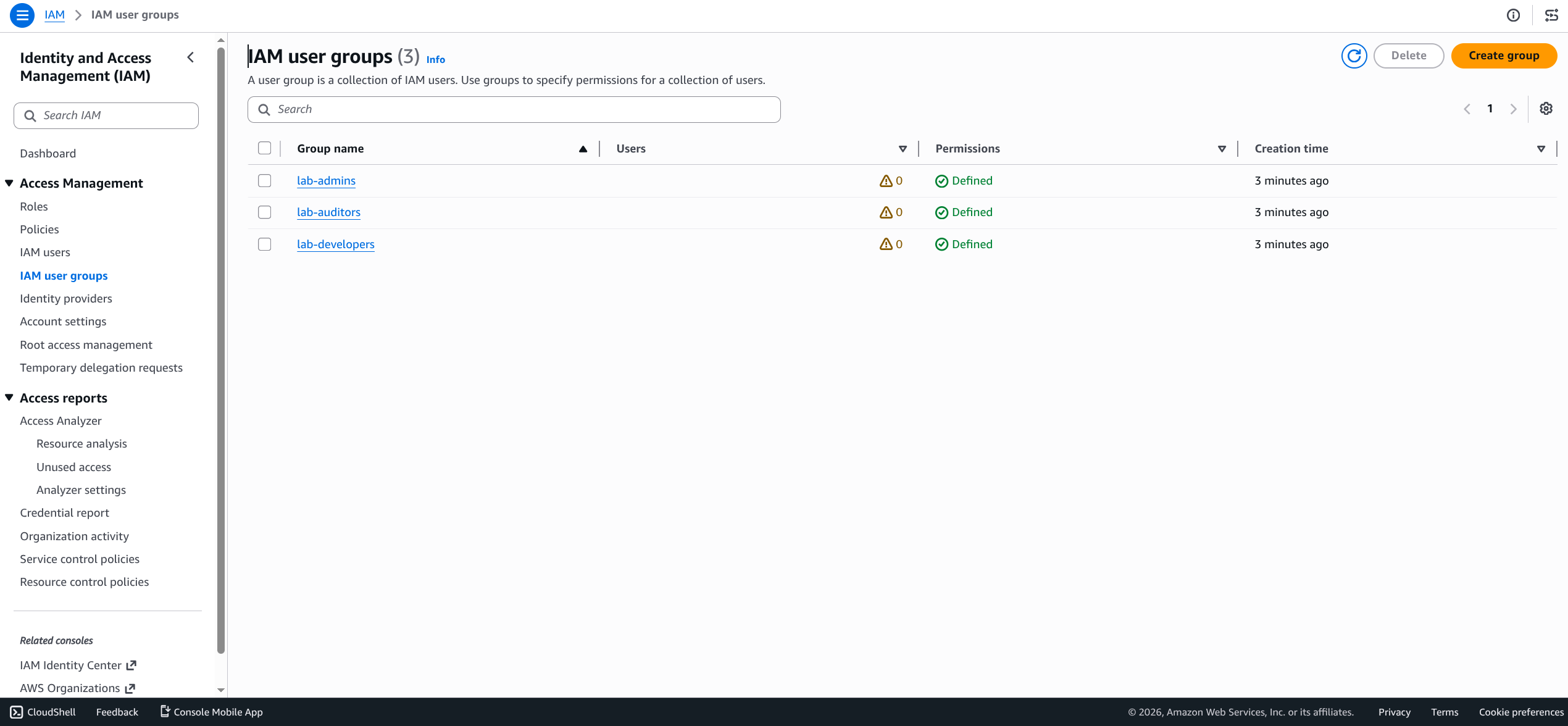 Three baseline groups. The admin draws
 AdministratorAccess through lab-admins membership, not a direct user attachment.
Roles, not long-lived keys (AC-6 / AC-3 / IA-5)
Three baseline roles, all minting short-lived credentials instead of static keys:
LabCrossAccountAuditor: read-only auditor access with anaws:MultiFactorAuthPresentMFA-on-assume condition in the trust policy. At lab scope the trust principal is the account itself. In production that principal swaps to a dedicated auditor account without touching the permission side.LabEC2InstanceProfile: EC2 service principal, for instances that need AWS access without embedded keys.LabLambdaExecutionRole: Lambda service principal.
A role you can assume expires on its own. Nothing to rotate. Nothing to leak.
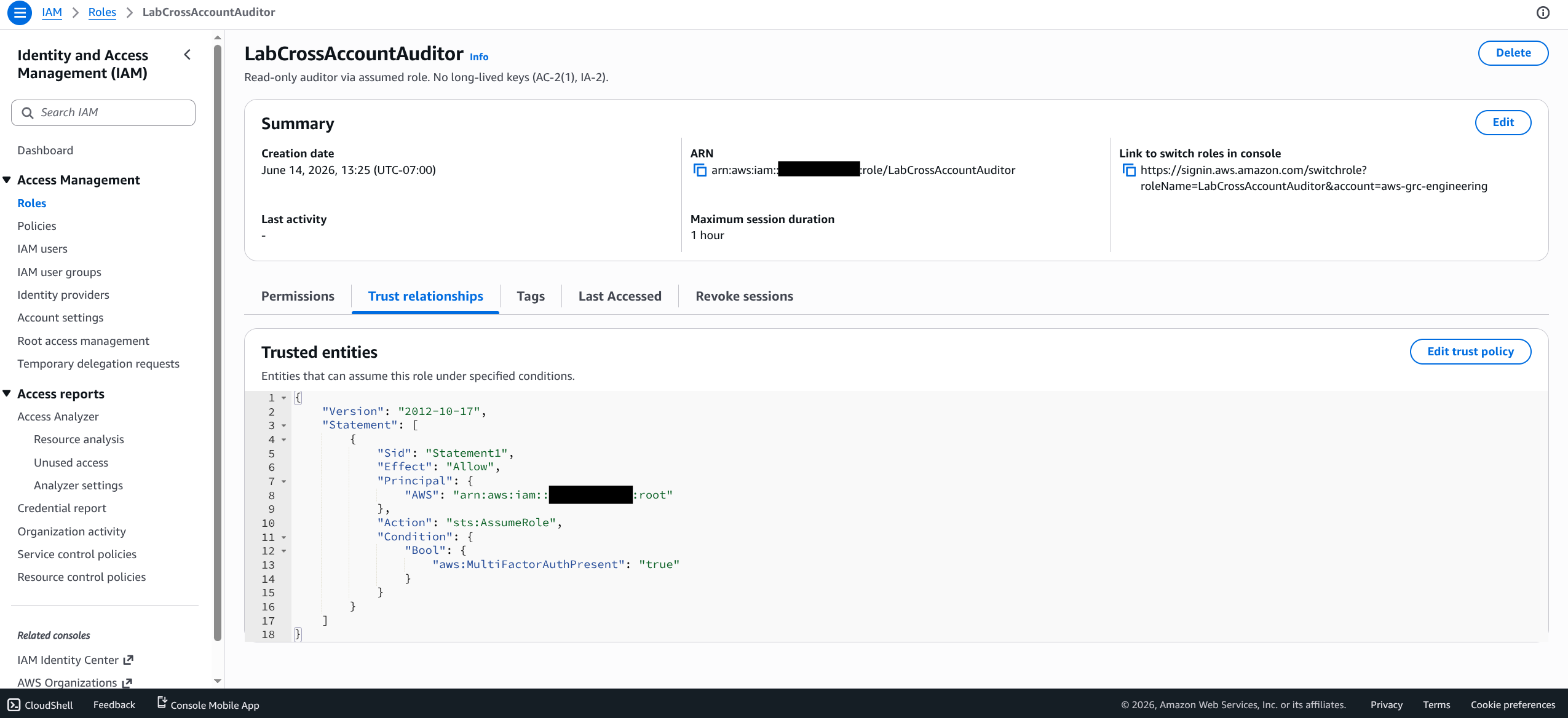
LabCrossAccountAuditor trust relationship: sts:AssumeRole gated by aws:MultiFactorAuthPresent. Account ID blacked out in the Summary ARN and the :root principal.
IAM Access Analyzer (AC-3 / CA-7)
I enabled an account-level external-access analyzer to watch for resource policies that grant access outside the account’s zone of trust.
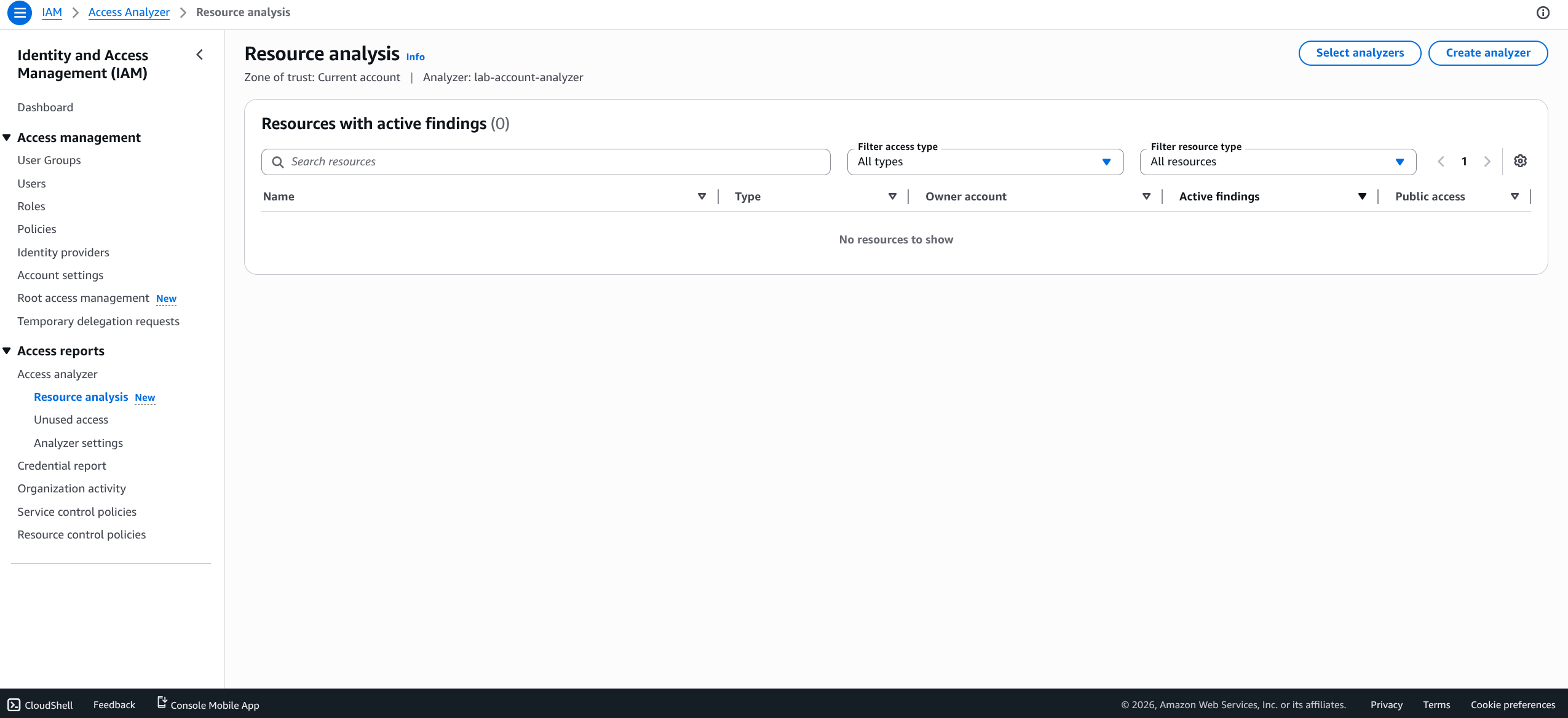
lab-account-analyzer, account zone of trust, zero external-access findings.
IAM Identity Center: a topology change disguised as a toggle
I enabled Identity Center on the existing organization and provisioned a single read-only permission set (LabReadOnly, AWS-managed ViewOnlyAccess) to the account through a LabWorkforce directory group. That is how I stop minting per-account IAM users.
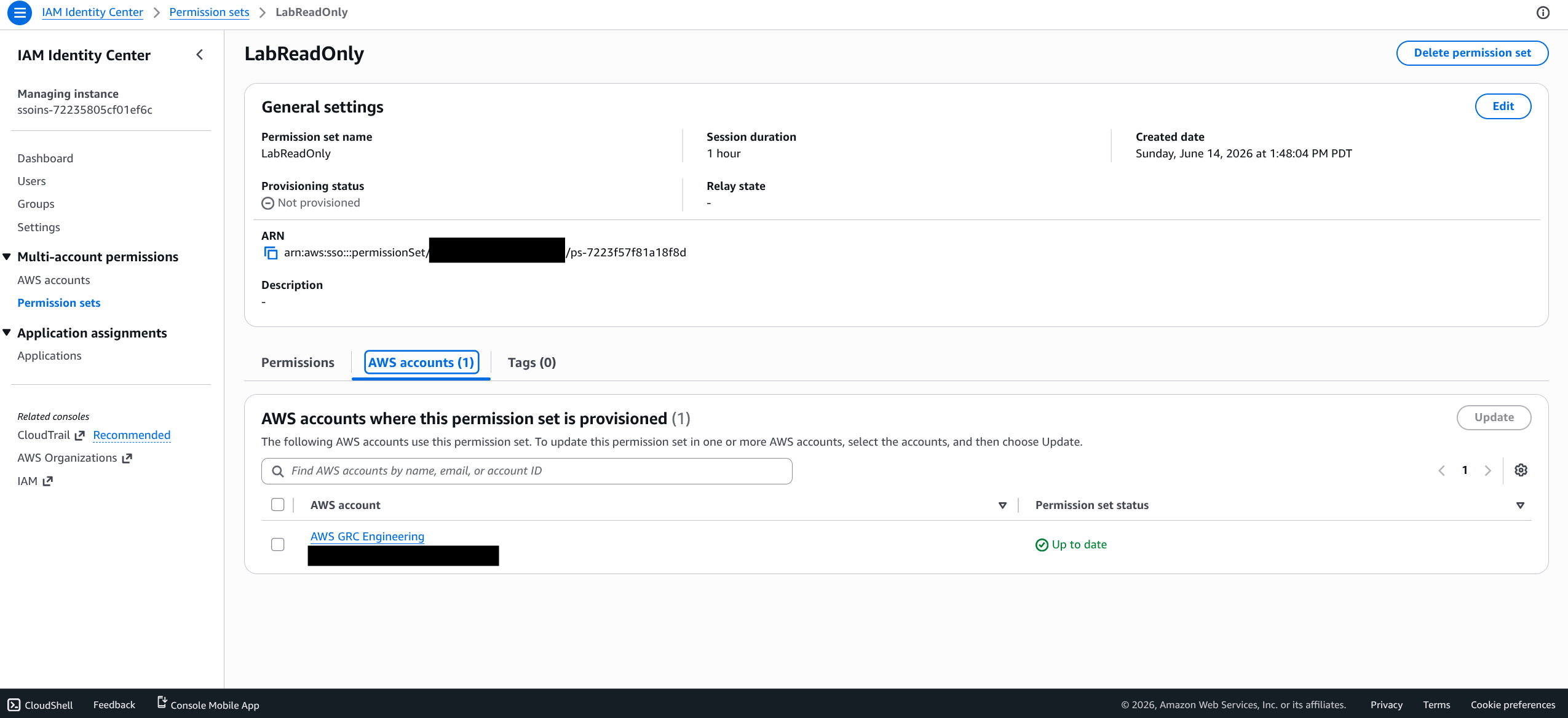
LabReadOnly (ViewOnlyAccess) provisioned through the LabWorkforce group. Account ID and email blacked out in the account row.
Step 4: Prove it (re-run the same instrument)
I closed the loop with the same tool I opened with. Same credential report, before versus after:
aws iam generate-credential-report
aws iam get-credential-report --output text --query Content | base64 --decode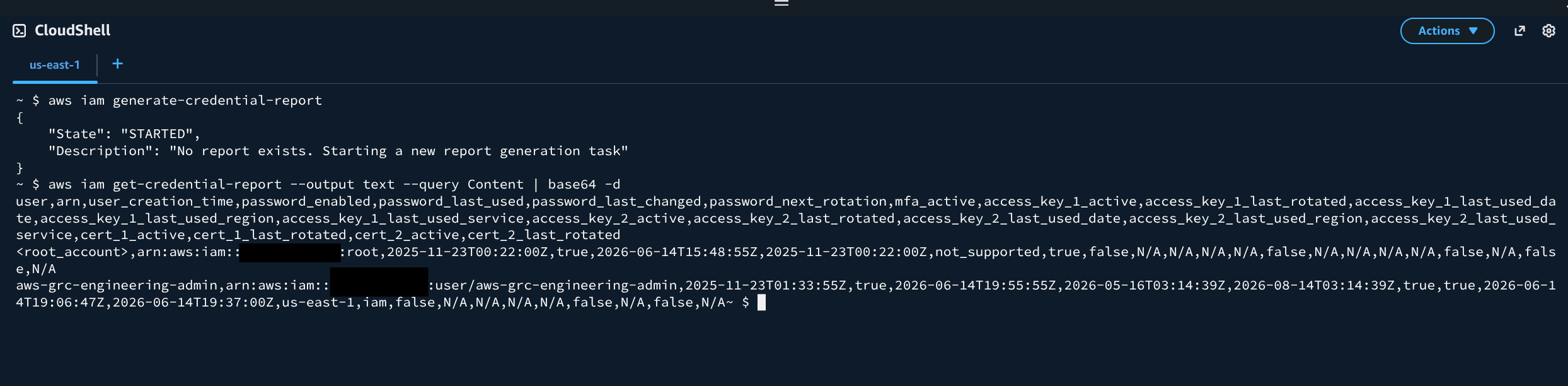 Credential report re-run as proof: every IAM user MFA-active, admin down to a single key created today. Account ID blacked out in the ARNs.
After the build, the report shows root MFA on with no root access keys, the admin principal carrying MFA and a single key created today (the 203-day key gone), and every IAM user sitting behind group-attached RequireMFA. I also confirmed the password fields stuck:
aws iam get-account-password-policy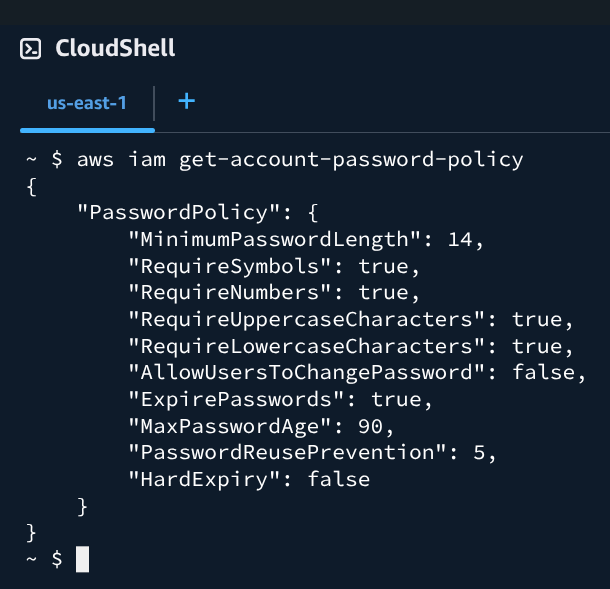
PasswordReusePrevention: 5 from the CLI. A password policy has no ARN, so nothing to redact.
Same instrument, before and after. That is the evidence.
The IA-5(1) asterisk most walkthroughs skip
The password policy reads “90-day rotation, complexity, history of 5.” That is a Rev 4-shaped control.
NIST 800-53 Rev 5 IA-5(1) dropped forced periodic rotation. It aligns with SP 800-63B: screen new passwords against breach corpora and change credentials on evidence of compromise, not on a calendar. The same revision removed the password-history clause Rev 4 carried, so reuse prevention is a Rev 4-shaped knob too. Length is favored over mandatory complexity, though complexity isn’t gone from the control text: IA-5(1)(h) still lets an organization enforce its own composition rules, and many FedRAMP and CJIS shops do. CJIS v6.0 takes a similar posture, with one difference: it relaxes the legacy 90-day cycle to a 365-day maximum instead of eliminating periodic change outright.
So why configure 90-day rotation at all? Because that is what the AWS IAM account password policy can express. The knob exists. Modern guidance has no matching knob on this surface. I configured the available control and named the delta, instead of presenting calendar rotation as unqualified best practice.
Control mappings
| Configuration | NIST 800-53 Rev 5 | FedRAMP High | CJIS v6.0 |
|---|---|---|---|
| Root MFA enabled, no root access keys | IA-2(1) | IA-2(1) | IA-2 / AAL2 |
| Password policy (90-day max, 14-char min, complexity, history of 5) | IA-5, IA-5(1) | IA-5, IA-5(1) | IA-5, IA-5(1) |
MFA enforcement via policy condition (BoolIfExists) | IA-2(1), IA-2(2) | IA-2(1), IA-2(2) | IA-2 / AAL2 |
| Group-based least-privilege design | AC-2, AC-6 | AC-2, AC-6 | AC-2, AC-6 |
| IAM Access Analyzer enabled | AC-3, CA-7 | AC-3, CA-7 | AC-3, CA-7 |
| Cross-account auditor role (no long-lived keys) | AC-6, AC-3, IA-5 | AC-6, AC-3, IA-5 | AC-6, AC-3 |
| Identity Center federated workforce access | IA-2(8), AC-2, AC-3 | IA-2(8), AC-2, AC-3 | IA-2(8), AC-2, AC-3 |
Two notes on the CJIS column. “AAL2” is the NIST SP 800-63B authenticator-assurance level CJIS v6.0 references for advanced authentication, not a CJIS control number. On the hardware: the admin’s MFA is a TOTP app plus two FIDO2 hardware keys. FIDO2 is phishing-resistant, and a FIPS 140-validated hardware key meets AAL3, so this configuration exceeds the CJIS v6.0 IA-2 AAL2 floor for criminal-justice information.
One CLI detail: a FIDO2/WebAuthn assertion can’t be passed to sts:get-session-token, which only accepts a six-digit TOTP code. A FIDO2-only user reaches the CLI through aws login (AWS CLI v2.32.0+, browser-based WebAuthn that mints auto-refreshing temporary credentials) or by enrolling a TOTP authenticator as a second device. The hardware keys cover console sign-in. The TOTP app backs get-session-token.
What’s next
This was the console walkthrough. The next post codifies the same baseline as a reusable Terraform module (iam-hardening) whose compliance_attestation output computes its booleans from deployed resource state, not from input variables. That module becomes Component Definition input for the OSCAL evidence pipeline. The series continues with CloudTrail, S3 encryption, KMS, Config rules, and Security Hub.